Showing posts with label Cornell Notes. Show all posts

Sunday, September 13, 2015

Study Skills Level 1 Quiz


Welcome to the Study Skills Learning Strategies Quiz! Scroll down to the quiz form to begin.

SQ3R Practice: 

Article: Internet

From Wikipedia, the free encyclopedia


Internet map
The Internet is a large group of computers that are connected to each other. The Internet is used to send information quickly between computers around the world. It has millions of smaller domesticacademicbusiness, and government networks and websites, which together carry many different kinds of information (facts and details) and services. So in other words, the Internet is a network of networks.

History[change | change source]

The Internet was developed in the United States by the "United States Department of Defense Advanced Research Projects Agency" (DARPA). It was first connected in October, 1969.[1] The World Wide Web was created at CERN in Switzerland in 1989 by a British (UKman named Tim Berners-Lee.
Today, people can pay money to access the Internet from Internet Service Providers. Some services on the Internet cost nothing to use. Sometimes the people who offer these free services use advertising to make money from them. The alternative (other) name, "Net" came from "Inter(net)".

Services on the Internet[change | change source]

The Internet is used for many things, such as electronic mailonline chatfile transfer, and the interlinked web pages and other documents of the World Wide Web.
The most used service on the Internet is the World Wide Web (which is also called the "Web"). The Web contains websitesblogs, and also wikis like WikipediaWebpages on the internet can be seen and read by anyone unless the page needs a password, or it is blocked.
The second major use of the Internet is to send and receive e-mail. E-mail is private and goes from one user to another. Instant messaging (such as AIM or ICQ) is similar to email, but allows two or more people to chat to each other much faster.
Some governments think the Internet is a bad thing, and block all or part of it. For example, the Chinese government thinks that Wikipedia is bad. Many times no one in China can read it or add to it.[2] Some parents block parts of the Internet they think are bad for children to see. Well-known examples of the whole Internet being blocked are in North Korea[3] and Myanmar.

Dangers on the Internet[change | change source]

The Internet can also be a dangerous place. Information that people put on the Internet is not always checked, and some information may not be true. Some information may even be harmful. Also, if someone sends information through the internet, sometimes other people can read it even when they are not supposed to. For example, Facebook has had some problems with privacy settings. Internet users can post information online, but this can be bad idea unless the person is very sure of what they are doing. A good way to check for a secure website is to make sure the URL starts with https:// instead of http://, this means it is a secure site. This only stops other people from reading what a user types. It does not mean the website is safe.
  • Some websites may trick people into downloading viruses that can harm a computer or spyware that spies on its users (looks at what they are doing and tells someone else). E-mails can also have harmful files with them as "attachments".[4]
  • In Internet chatrooms, people might be preying on others or trying to stalk or abuse them.
  • The Internet contains content that people may find offensive such as pornography, as well as content intended to be offensive.

Related pages[change | change source]

References[change | change source]

  1. Jump up "A Brief History of the Internet". walthowe.com. Retrieved 13 July 2010.
  2. Jump up posted by abennett (2004-06-14). "Chinese censors block access to Wikipedia". ITworld. Retrieved 2009-10-16.
  3. Jump up "Rapport @ 09 GB" (PDF). Retrieved 2009-10-16.
  4. Jump up "Internet Safety: Internet 101 - Viruses, worms and Trojans". Wiredsafety.org. Retrieved 2009-10-16.

Study Skills Level 2 Lesson


Study Skills Level Two Lesson
Who is in charge of your learning?
  1. Your teachers
  2. Your parents
  3. You
The answer is…...You!
Your parents may help, your teachers may help, but in the end, whether you remember what you learn or let it fly out of your brain forever-- that’s up to you.

So how do you make the most of your learning? Here are some basic skills you need in order to make sure you are studying well.

  1. Alemanaka: Use a to-do list or a Calendar. Your alemanaka is great for this! Write down everything that you need to do. When you finish it, CROSS IT OFF. If you haven’t done it at the end of the week, copy over all of the unfinished things and put them at top priority for the next week. That way you’ll never wonder, “What do I have to do….?” It’s all right there at your fingertips. Use these helpful tips for making your to-do list!


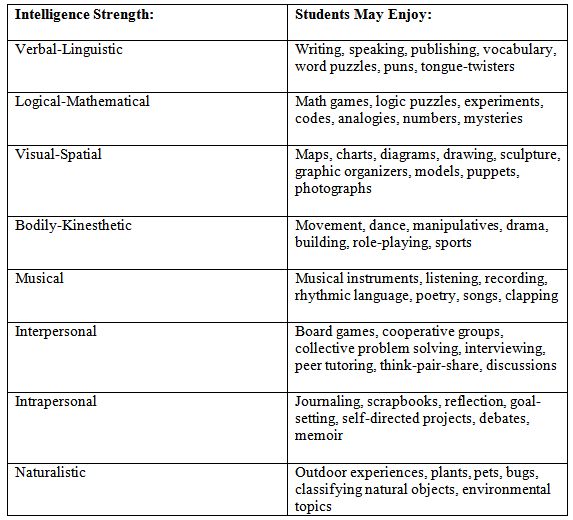
  1. Multiple Intelligence: Play to your strengths. When you go home with the assignment to get ready for a test or study or notes, use your multiple intelligence strengths to look over the information. If you are studying for a science test and you love art, redraw your written notes as illustrations! If you are studying English vocabulary and your strength is music, make up a song to review the new words. Use your strengths to make the information your own.
    Here are some multiple intelligence strategies for each strength:
    For even more ideas, see Posted by Vishal Jain|July 30, 2008
    MULTIPLE INTELLIGENCES: STRATEGIES IN THE CLASSROOM

  1. SQ3R: When you are reading, using the SQ3R strategy. This means: Survey, Question, Read, wRite, and Review. Stories are pretty easy to read by just jumping in. But informational texts can take more work to understand. Before you start, Survey what you’re going to read. Are there text boxes? Are there titles? Are there captions? Are there words that seem to be repeated often? Next, ask yourself Questions about the content. What questions do you think will be answered as you read? Next, Read the passage. Then Write down the main ideas in each section.  Last, Review what you read and the main ideas, as if you are getting ready to present them to somebody else.


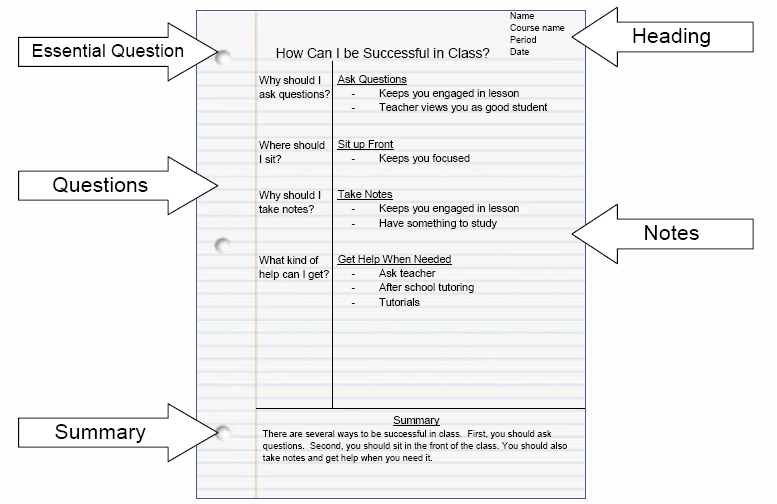
  2. Cornell Notes: In class we use this format, but you should use this format any time you want to really learn new information.  Here are the main parts of Cornell Note Taking:
    1. Title and Date. This makes it easy to find the information you need later when you are reviewing your notes.
    2. Big Questions. In the left column, write down the big, important questions that are answered in your notes.
    3. Big Conclusions: In the right column, write down the big, important conclusions. You can add some evidence and support as well, but make sure to focus on the BIG ideas.
    4. Summary: At the bottom of every page of notes, summarize what you learned.

Cornell Notes.png
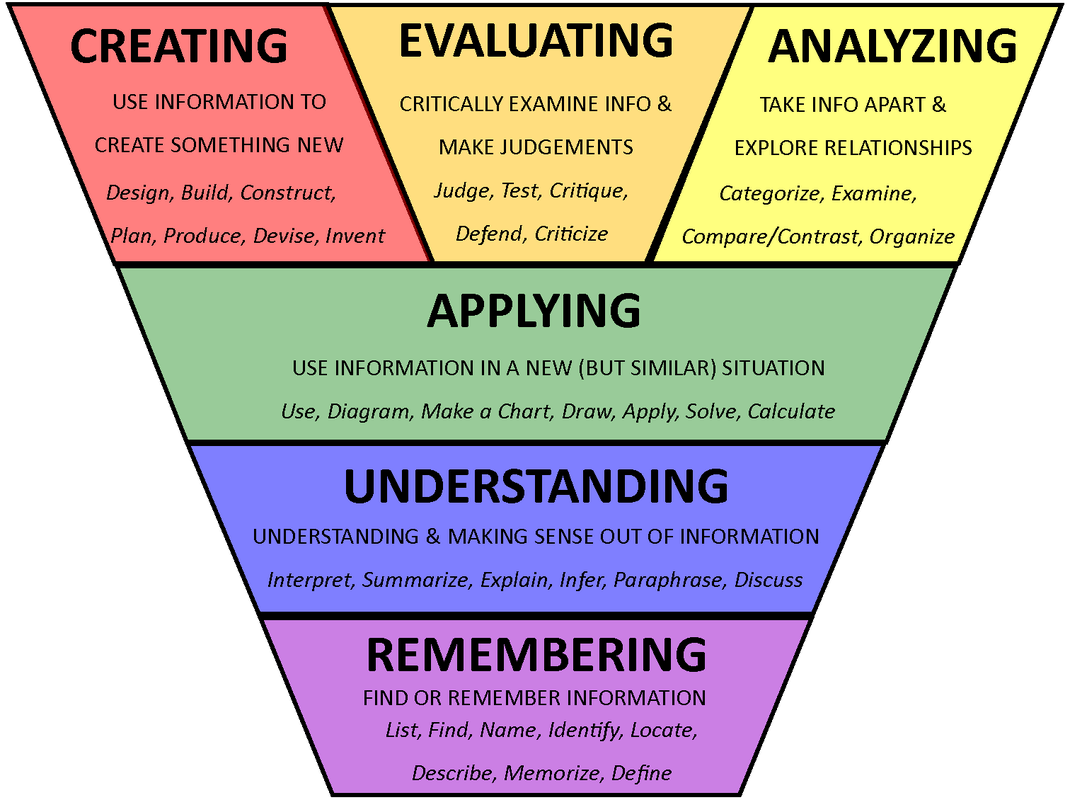
5. Ask Fat Questions This is based on the idea of Bloom’s taxonomy-- that there are surface questions that just make you remember information, there are questions that deepen your understanding, that help you apply your knowledge, and that on the highest of level, help you create something new with what you’ve learned.
Blooms-Taxonomy.png


Ask Fat Questions
· How could that…
· What is your opinion on….
· How did you react when..
· Why do you think…
· Why is this…
· How do you feel about…
· What reasons would you give for…
· How does _____relate to your own experiences?
· Explain…
· Give me some examples of…
· Why do you think_____ did that?
· What does _____ make you think about?


Use these strategies to improve your study habits! Good luck! Take the study skills Level 2 Quiz to see how well you’re able to use these to learn new things.

Sunday, July 26, 2015

Study Skills Level Two Quiz

Welcome to the Study Skills Learning Strategies Quiz! Scroll down to the quiz form to begin.

SQ3R Practice: 

Article: Internet

From Wikipedia, the free encyclopedia


Internet map
The Internet is a large group of computers that are connected to each other. The Internet is used to send information quickly between computers around the world. It has millions of smaller domesticacademicbusiness, and government networks and websites, which together carry many different kinds of information (facts and details) and services. So in other words, the Internet is a network of networks.

History[change | change source]

The Internet was developed in the United States by the "United States Department of Defense Advanced Research Projects Agency" (DARPA). It was first connected in October, 1969.[1] The World Wide Web was created at CERN in Switzerland in 1989 by a British (UKman named Tim Berners-Lee.
Today, people can pay money to access the Internet from Internet Service Providers. Some services on the Internet cost nothing to use. Sometimes the people who offer these free services use advertising to make money from them. The alternative (other) name, "Net" came from "Inter(net)".

Services on the Internet[change | change source]

The Internet is used for many things, such as electronic mailonline chatfile transfer, and the interlinked web pages and other documents of the World Wide Web.
The most used service on the Internet is the World Wide Web (which is also called the "Web"). The Web contains websitesblogs, and also wikis like WikipediaWebpages on the internet can be seen and read by anyone unless the page needs a password, or it is blocked.
The second major use of the Internet is to send and receive e-mail. E-mail is private and goes from one user to another. Instant messaging (such as AIM or ICQ) is similar to email, but allows two or more people to chat to each other much faster.
Some governments think the Internet is a bad thing, and block all or part of it. For example, the Chinese government thinks that Wikipedia is bad. Many times no one in China can read it or add to it.[2] Some parents block parts of the Internet they think are bad for children to see. Well-known examples of the whole Internet being blocked are in North Korea[3] and Myanmar.

Dangers on the Internet[change | change source]

The Internet can also be a dangerous place. Information that people put on the Internet is not always checked, and some information may not be true. Some information may even be harmful. Also, if someone sends information through the internet, sometimes other people can read it even when they are not supposed to. For example, Facebook has had some problems with privacy settings. Internet users can post information online, but this can be bad idea unless the person is very sure of what they are doing. A good way to check for a secure website is to make sure the URL starts with https:// instead of http://, this means it is a secure site. This only stops other people from reading what a user types. It does not mean the website is safe.
  • Some websites may trick people into downloading viruses that can harm a computer or spyware that spies on its users (looks at what they are doing and tells someone else). E-mails can also have harmful files with them as "attachments".[4]
  • In Internet chatrooms, people might be preying on others or trying to stalk or abuse them.
  • The Internet contains content that people may find offensive such as pornography, as well as content intended to be offensive.

Related pages[change | change source]

References[change | change source]

  1. Jump up "A Brief History of the Internet". walthowe.com. Retrieved 13 July 2010.
  2. Jump up posted by abennett (2004-06-14). "Chinese censors block access to Wikipedia". ITworld. Retrieved 2009-10-16.
  3. Jump up "Rapport @ 09 GB" (PDF). Retrieved 2009-10-16.
  4. Jump up "Internet Safety: Internet 101 - Viruses, worms and Trojans". Wiredsafety.org. Retrieved 2009-10-16.

Study Skills Level One Lesson

Study Skills Level One Lesson
Who is in charge of your learning?
  1. Your teachers
  2. Your parents
  3. You
The answer is…...You!

Your parents may help, your teachers may help, but in the end, whether you remember what you learn or let it fly out of your brain forever-- that’s up to you.

So how do you make the most of your learning? Here are some basic skills you need in order to make sure you are studying well.

  1. Alemanaka: Use a to-do list or a Calendar. Your alemanaka is great for this! Write down everything that you need to do. When you finish it, CROSS IT OFF. If you haven’t done it at the end of the week, copy over all of the unfinished things and put them at top priority for the next week. That way you’ll never wonder, “What do I have to do….?” It’s all right there at your fingertips.

  1. Multiple Intelligence: Play to your strengths. When you go home with the assignment to get ready for a test or study or notes, use your multiple intelligence strengths to look over the information. If you are studying for a science test and you love art, redraw your written notes as illustrations! If you are studying English vocabulary and your strength is music, make up a song to review the new words. Use your strengths to make the information your own.

  1. SQ3R: When you are reading, using the SQ3R strategy. This means: Survey, Question, Read, wRite, and Review. Stories are pretty easy to read by just jumping in. But informational texts can take more work to understand. Before you start, Survey what you’re going to read. Are there text boxes? Are there titles? Are there captions? Are there words that seem to be repeated often? Next, ask yourself Questions about the content. What questions do you think will be answered as you read? Next, Read the passage. Then Write down the main ideas in each section.  Last, Review what you read and the main ideas, as if you are getting ready to present them to somebody else.

  2. Cornell Notes: In class we use this format, but you should use this format any time you want to really learn new information.  Here are the main parts of Cornell Note Taking:
    1. Title and Date. This makes it easy to find the information you need later when you are reviewing your notes.
    2. Big Questions. In the left column, write down the big, important questions that are answered in your notes.
    3. Big Conclusions: In the right column, write down the big, important conclusions. You can add some evidence and support as well, but make sure to focus on the BIG ideas.
    4. Summary: At the bottom of every page of notes, summarize what you learned.

Use these strategies to improve your study habits! Good luck! Take the study skills Level 1 Quiz to see how well you’re able to use these to learn new things.